Filmora 15 remains one of the easiest full desktop editors for a new creator to understand. Its timeline is approachable, useful guidance appears inside the workflow, and it now includes multicamera editing, masking, motion tracking, captions, audio tools and a large set of AI-assisted features. The difficult part is no longer learning what the buttons do. It is understanding which plan, credits and asset rights you actually need.
The Test & Reviews owner used Filmora 13 in April 2024 and found it much easier to navigate than professional editors. He particularly liked drag-and-drop editing, aspect-ratio changes, overlays, blending and the way automated tools reduced repetitive work. That is useful dated experience, but the old article did not retain its project file, source clips, hardware details, export settings or support records. We therefore preserve the experience without presenting it as a current Filmora 15 benchmark or assigning a numeric score.
Filmora review: quick verdict
Filmora is a strong first paid editor for YouTube videos, tutorials, family projects and social content when speed matters more than granular professional control. It provides more room to grow than a very simple browser editor, while remaining easier to approach than Adobe Premiere or DaVinci Resolve.
Buy carefully. The advertised perpetual license is tied to Filmora 15 updates, not every future major release. The Advanced plan includes 1,000 AI credits per month, while the perpetual plan includes 1,000 credits once. Creative Assets is a separate subscription that can be offered as an auto-renewing trial during checkout. Commercial creators must also verify the license for every music track, sound effect and stock asset they use.
Our position: download the free version, rebuild one real project, and export a watermarked proof before paying. Filmora is easy to learn, but its plan structure and asset rights need more attention than its interface.
Pros and cons
Pros
- Welcoming timeline and in-app guidance for first-time editors.
- Good range of titles, masking, tracking, captions, audio and social-video tools.
- Windows and macOS versions, with lower entry cost than many professional editors.
- Free version has no time limit, so you can test a complete workflow before buying.
- Subscription and version-specific perpetual options are both available.
Cons
- Free exports carry a watermark, apart from limited promotional offers.
- Perpetual means Filmora 15, not free upgrades to every future major version.
- AI credits and Creative Assets can make the real cost higher than the editor price.
- Official commercial-use and audio-asset rules require careful reading.
- Less granular control and weaker professional interchange than higher-end editors.
What changed since our Filmora 13 review?
The original article treated Filmora 13 as the latest release. Wondershare now lists Filmora 15 as the current major version. The core proposition is familiar - a conventional timeline made approachable for non-editors - but the product has moved farther into AI generation and more advanced project organization.
Filmora 15 added AI Extend, a pen tool, animated charts, separate source and timeline monitoring, dual-timeline editing and subproject imports. The current guide also documents multicamera clips, keyframe graph editing, planar tracking, professional video scopes, audio meters and dual-monitor support. These additions give an ambitious beginner more space to grow, but they do not automatically make Filmora a replacement for a mature collaborative post-production workflow.
The editing experience
Why Filmora feels easier
Filmora uses the editing concepts that transfer to larger desktop tools: a media library, preview monitor, layered timeline, trim tools, keyframes, transitions, titles, audio tracks and an export panel. The difference is presentation. Common actions are visible, presets are prominent, and the app guides the editor rather than assuming years of production experience.
That matches the owner's April 2024 experience with Filmora 13. He could layer clips, add effects, change aspect ratios and create useful results without feeling lost. We retain that observation because it was explicitly recorded at the time. We do not extend it into claims about Filmora 15 stability, render speed or current AI quality without a new retained test.
Where experienced editors may feel constrained
Ease of use creates tradeoffs. Preset-led editing is fast, but an experienced editor may want deeper parameter control, more predictable media management, mature interchange, shared-project workflows or stronger control over color and audio finishing. Independent current testing by TechRadar reached a similar question: it found Filmora welcoming and capable for beginners, while wanting more control over some transitions and effects.
That does not make Filmora a weak editor. It makes the target user important. A new YouTube creator can value speed more than interchange standards; an editor handing projects among multiple specialists may value the opposite.
Useful Filmora 15 features
Timeline and subprojects
Multiple tracks, compound clips, dual timelines and subproject imports support projects beyond a basic one-track edit.
Text and captions
Text-based editing, speech-to-text, text-to-speech, caption tools and translation can accelerate talking-head and tutorial work.
Masking and tracking
Smart cutout, object removal, masking, motion tracking and planar tracking help isolate or follow subjects without manual frame-by-frame work.
Audio tools
Ducking, normalization, meters, denoise, vocal removal and synchronization cover common creator workflows.
Source and timeline monitors
Filmora 15 can preview source material separately from the edited sequence, a familiar and useful professional convention.
Social delivery
Aspect-ratio tools, auto reframe, captions, templates and short-clip workflows suit vertical and multi-platform publishing.
The feature list is extensive, but availability is not the same as unlimited use. Many of the generative and server-based features consume AI credits, and some assets require a separate subscription or have their own usage rights.
Filmora AI credits: the practical limit
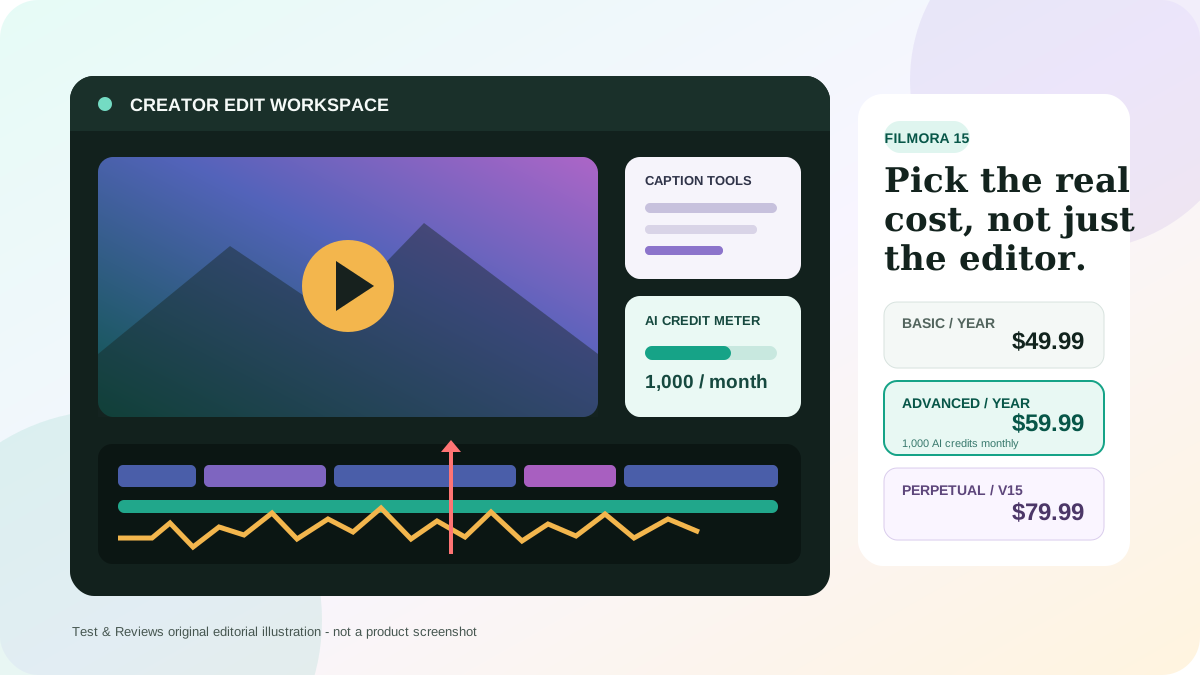
Filmora separates the desktop editor from usage-based AI. The current US plan table lists 1,000 credits per month with Advanced and 1,000 credits total with the perpetual license. Basic does not list an included monthly credit allowance, although AI features can be paid for with credits. Wondershare also sells credit packs.
| Credit option | Current US price | Validity | What to notice |
|---|---|---|---|
| Advanced allowance | Included | 1,000 each month | Used across 20+ credit-based AI features |
| Perpetual allowance | Included | 1,000 total | Not a recurring monthly allowance |
| 1,500-credit pack | $9.99 | One year | Useful for occasional generation after included credits run out |
| 2,000-credit subscription | $9.99/month | Resets every 30 days | A separate recurring cost |
| 5,000-credit pack | $25.99 | One year | Lower cost per credit than the smallest pack |
Wondershare's own estimator says 1,500 credits can cover approximately 375 minutes of speech-to-text, 50 AI music generations, 16 text-to-video uses or 10 Video Extend uses. These are estimates, not guarantees, and the cost varies by feature and generation complexity. Before choosing a plan, list the AI actions you will repeat each month and test their actual deductions in the account history.
Filmora pricing in 2026
The US individual storefront showed the following prices when checked on July 22, 2026. Wondershare uses promotions and different checkout variants, so confirm the final currency, tax, operating system and renewal price in your cart.
| Plan | Displayed price | Updates | AI allowance | Best fit |
|---|---|---|---|---|
| Free | $0 | Current free version | No included plan allowance shown | Testing the complete workflow; exports carry a watermark |
| Basic | $49.99/year | Future version upgrades while subscribed | Credit-based AI paid separately | Editors who need watermark-free conventional tools |
| Advanced | $59.99/year | Future version upgrades while subscribed | 1,000 credits/month | Regular users of captions and AI-assisted tools |
| Perpetual | $79.99 once | Filmora 15 updates only | 1,000 credits once | People happy to stay on version 15 |
| Premium | $99.99/year | Future version upgrades while subscribed | 2,000 credits/month | Higher AI use and more cloud storage |
Check the current Filmora plans (direct non-affiliate link).
What “perpetual” really means
The current perpetual plan can keep running without an annual editor subscription, but the plan table says “Enjoy Filmora 15 updates”. It does not promise Filmora 16 or later. Cloud services, AI generation and premium asset access also remain separate from ownership of the version-15 desktop editor.
Compare the time horizon, not just the first payment. At the displayed prices, perpetual costs $30 more than one Basic year and $20 more than one Advanced year. It can be economical if version 15 remains compatible with your operating system and formats for several years. It is less compelling if you expect every major upgrade or use recurring AI generation.
The Creative Assets checkout trap
Filmora Creative Assets is a separate library, not the editor license. The current asset page lists $19.99 monthly, $39.99 quarterly or $79.99 yearly. Wondershare sometimes presents a seven-day asset trial alongside an editor purchase; that trial can auto-renew if it is selected and not canceled.
Read every checkbox in the cart and save the order summary. Buying Creative Assets alone does not unlock watermark-free Filmora exports. Conversely, buying Filmora does not automatically provide an ongoing license to every premium asset.
Cancellation and refunds
Subscriptions renew automatically until canceled. Cancellation stops the next term and service continues through the paid period. Wondershare's refund policy describes up to 30 days for many initial direct purchases, but it is conditional rather than a no-questions-asked promise. Change of mind, subjective dissatisfaction and used credits are generally excluded, and the subscription terms say the 30-day policy does not apply to auto-renewal charges. Third-party store purchases follow that store's process.
Commercial use and asset licensing
This is the area a monetized creator or business should resolve before publishing. Wondershare's Filmora-specific terms say an individual can use most built-in visual elements commercially with “Video is made by Filmora” in the description, but they prohibit commercial use of the built-in music tracks and sound effects. A business plan removes the attribution requirement for the editor, yet the same terms still restrict built-in music and sound effects.
Creative Assets has its own library and licensing information. Its sales page markets millions of assets for commercial use, while also noting that more than 97% - not necessarily every asset - are commercially available. Rights can vary by asset, channel, advertising use and subscription status.
Practical rule: for client work, ads or monetized channels, save the asset's license page and invoice when you download it. Do not assume “included in the app” means unrestricted commercial use. If the terms do not clearly cover your project, obtain written confirmation from Wondershare or use separately licensed media.
System requirements and real performance
Wondershare currently lists Windows 7 through Windows 11 for x64 machines and Windows 10 or 11 for ARM. The Windows minimum is an Intel sixth-generation processor or AMD Ryzen 3 1300X with 8GB RAM. For HD and 4K work, Wondershare recommends a ninth-generation Intel processor or newer and 16GB RAM. Installation requires at least 10GB free, with an SSD recommended for HD and 4K.
For Mac, the current specifications list an iMac from 2017 or MacBook from 2018 as minimum, 8GB RAM, 2GB VRAM and 10GB installation space. It supports Apple M-series systems, while 16GB memory and 4GB VRAM are specified for HD and 4K work.
Those are compatibility guidelines, not a promise of smooth playback. Codec, resolution, frame rate, effect stack, background generation, storage speed and graphics drivers all matter. The old review's broad claim that Filmora was ideal for an old low-end computer was not supported by a retained machine record or project. Test your own mixed media in the free version and use proxies or reduced preview quality where needed.
Filmora versus the main alternatives
| Editor | Choose it for | Main tradeoff |
|---|---|---|
| Filmora 15 | Fast onboarding, social content, tutorials and creator projects | Plan complexity, AI credits and less granular professional control |
| DaVinci Resolve | Powerful free editing, color and audio with room to grow | Higher learning and hardware demands |
| Adobe Premiere | Professional cross-platform workflows and Adobe integration | Annual subscription, complexity and limited single-app AI credits |
| Final Cut Pro | Fast Mac editing with a one-time purchase | Mac only and a different magnetic-timeline model |
| Clipchamp | Simple browser/Windows editing and quick 1080p work | Less depth for complex projects |
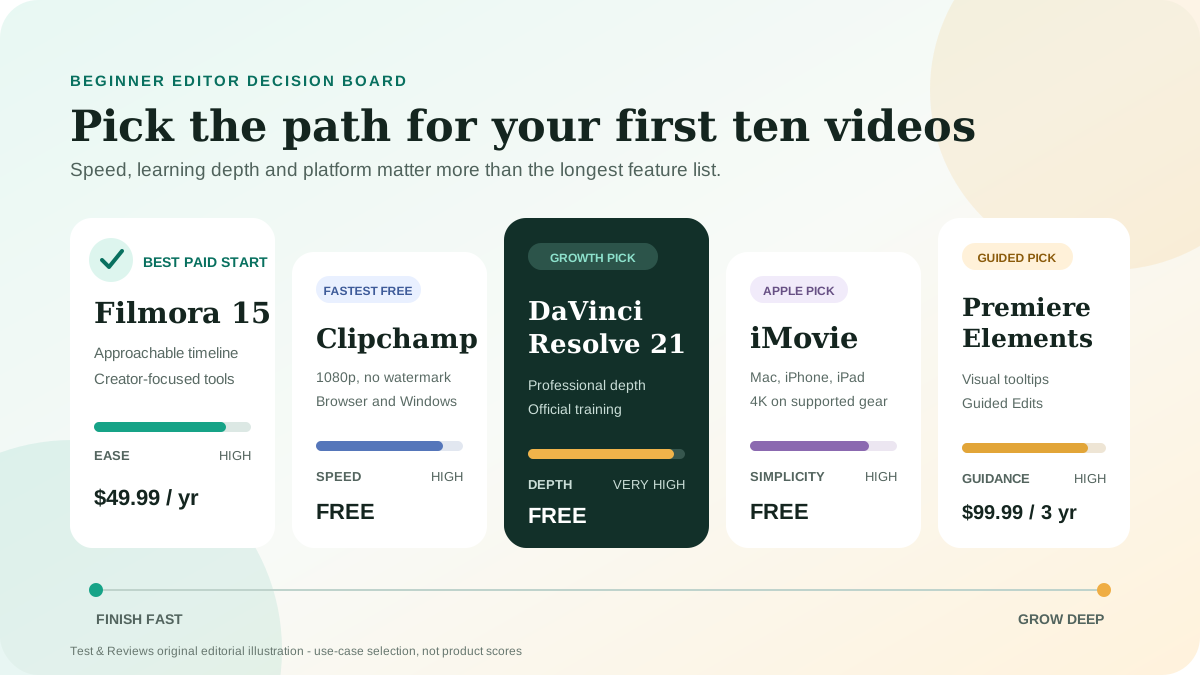
Start with the workflow you actually need. Filmora is easier than Resolve and Premiere for many beginners, but “easiest” is not automatically “best.” If you expect to move into collaborative production, learning a deeper editor now may avoid a later migration. If your priority is publishing polished creator videos quickly, Filmora's shorter learning curve may be the better investment.
Who should buy Filmora?
Choose Filmora when
- You are moving beyond phone or browser editing for the first time.
- You create tutorials, talking-head videos, family projects or social clips.
- You value templates and guided tools more than deep parameter control.
- You will test the exact plan, credits and assets before purchase.
- You prefer a version-specific perpetual option over compulsory annual editor billing.
Choose another editor when
- You need reliable exchange with professional color, audio or VFX departments.
- You require detailed team permissions and shared project management.
- You want a capable free editor without watermarked exports.
- You need simple blanket licensing for commercial music and stock.
- Your workflow depends heavily on unlimited generative AI.
Our Filmora 15 retest plan
Before we publish a current score, Filmora must complete the same retained workflow we use for other desktop editors:
- Record the exact Filmora build, operating system, CPU, GPU, RAM, driver and storage.
- Retain a source package containing phone HEVC, screen capture, camera H.264/H.265, variable-frame-rate and separate audio.
- Create a ten-minute 4K project with captions, color corrections, layered audio, motion tracking and two delivery ratios.
- Measure import, proxy creation, playback, render and export with fixed presets.
- Log crashes, hangs, missing media, relinks, dropped frames and recovery behavior.
- Test text-based editing, speech-to-text, Smart Short Clips, object removal and one generative-video action.
- Record the exact AI-credit deduction, retries and usable output rate.
- Export using only clearly licensed assets and retain the license evidence.
- Open the project on a second supported computer and document missing dependencies.
- Contact support with a licensing and a technical question, retaining response time and answer quality.
Final verdict
Filmora remains easy to recommend as a product to test for beginner and solo-creator editing. The owner's 2024 experience supports the core promise: it made conventional timeline editing feel approachable and produced useful results without the intimidation of a professional suite.
We stop short of a scored recommendation for Filmora 15. The current editor is two major versions beyond that experience, and the buying decision now includes recurring AI credits, a separate asset library, version-limited perpetual upgrades and detailed commercial-use rules. Test the free version with your real project, choose the license for your actual time horizon, and document the rights for every commercial asset.
Frequently asked questions
Is Filmora good for beginners?
Yes, it is one of the more approachable full desktop timeline editors. The Test & Reviews owner's 2024 Filmora 13 experience and current independent testing both support that conclusion. Beginners should still test their own footage and computer before buying.
Is Filmora free?
The free version has no time limit and can save projects, but normal exports include a Filmora watermark. A paid editor plan removes the watermark.
Does Filmora's perpetual license include future versions?
The current plan table says the perpetual license includes Filmora 15 updates only. It does not promise later major versions such as Filmora 16.
Are Filmora AI tools unlimited?
No. Many AI features consume credits. Advanced currently includes 1,000 per month, Premium 2,000 per month, and the perpetual plan 1,000 once. Additional packs cost extra.
Can I use Filmora music in monetized videos?
Do not assume every built-in track is cleared. Wondershare's Filmora-specific terms prohibit commercial use of built-in music and sound effects, while separately licensed Creative Assets have their own rules. Check the exact asset and plan before publishing.
Is the 30-day refund guarantee unconditional?
No. Wondershare lists eligible and excluded circumstances. Change of mind, used credits, subjective AI dissatisfaction and many renewal charges are generally not covered. Regional consumer rights can differ.
Sources and update record
Facts and US prices checked July 22, 2026. Sources include Wondershare's current Filmora plans, Filmora 15 guide, AI credit store and estimator, Creative Assets plans, Windows requirements, Filmora-specific terms, refund policy, and subscription terms. TechRadar's current beginner-editor comparison was used only to frame independent evaluation questions; its score is not represented as ours.